
티스토리 뷰
비효율적인 컴포넌트 rendering
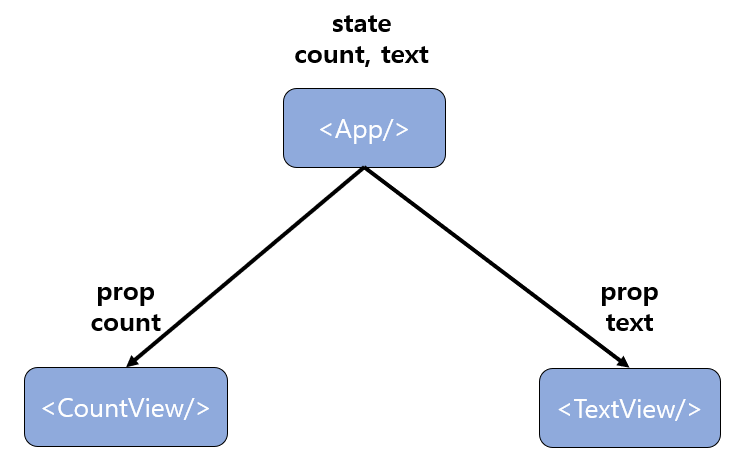
setCount(10);

setText("Hello");
App 컴포넌트 의 count state를 setCount로 변경하게 되면, App 컴포넌트가 랜더링 되고 자식 컴포넌트 들인 CountView 컴포넌트와 TextView 컴포넌트가 rendering된다.
count state가 바뀔 때 TextView 컴포넌트가 쓸데 없이 rendering 되는 낭비가 발생하고,
text state가 바뀔 때, CountView 컴포넌트가 rendering 되는 낭비가 발생한다.
비효율적인 rendering을 막기 위해 count state만 변경됬을 때는 CountView 컴포넌트만 , text state만 변경됬을 때는 TextView 컴포넌트만 rendering되어야 한다.
이러한 문제를 해결하기 위해서는 함수형 컴포넌트 에선 컴포넌트에게 업데이트 조건을 걸어 원하는 컴포넌트만 rendering이 되도록 하는 React.memo 을 사용 한다 !!
rendering 문제점
import React, { useState, useEffect } from "react";

const CountView = ({ count }) => {
  useEffect(() => {
    console.log(`CountView is update count: ${count}`);
  });
  return <div>{count}</div>;
};
const TextView = ({ text }) => {
  useEffect(() => {
    console.log(`TextView is update text: ${text}`);
  });
  return <div>{text}</div>;
};

const OptimizeText = () => {
  const [count, setCount] = useState(1);
  const [text, setText] = useState("");
  ///
  return (
    <div style={{ padding: 50 }}>
      <div>
        <h2>count</h2>
        <CountView count={count} />
        <button
          onClick={() => {
            setCount(count + 1);
          }}
        >
          +
        </button>
      </div>
      <div>
        <h2>text</h2>
        <TextView text={text} />
        <input
          value={text}
          onChange={(e) => {
            setText(e.target.value);
          }}
          text={text}
        />
      </div>
    </div>
  );
};

export default OptimizeText;
count + 버튼을 누를 때 마다, TextView 컴포넌트가 re-rendering 되는 낭비가 발생한다.
React.memo 를 활용하여 re-rendering 방지를 최적화 해준다. !!
rendering 최적화 / React.memo
import React, { useState, useEffect } from "react";

const CountView = React.memo(({ count }) => {
  useEffect(() => {
    console.log(`CountView is update count: ${count}`);
  });
  return <div>{count}</div>;
});
const TextView = React.memo(({ text }) => {
  useEffect(() => {
    console.log(`TextView is update text: ${text}`);
  });
  return <div>{text}</div>;
});

const OptimizeText = () => {
  const [count, setCount] = useState(1);
  const [text, setText] = useState("");
  ///
  return (
    <div style={{ padding: 50 }}>
      <div>
        <h2>count</h2>
        <CountView count={count} />
        <button
          onClick={() => {
            setCount(count + 1);
          }}
        >
          +
        </button>
      </div>
      <div>
        <h2>text</h2>
        <TextView text={text} />
        <input
          value={text}
          onChange={(e) => {
            setText(e.target.value);
          }}
          text={text}
        />
      </div>
    </div>
  );
};

export default OptimizeText;
컴포넌트를 React.memo 로 감싸 주게 되면 해당 컴포넌트는 prop이 변경될 때만 re-rendering 이 된다.
참고
[React] 실습 / API 호출 / useEffect / Mount
개요 React 에서 API 를 호출 해보자 !! useEffect 를 이용하여 컴포넌트 Mount 시점에 API의 결과값을 초기값으로 활용해보자 !! App.js import { useEffect, useRef, useState } from "react"; import "./styles..
espania.tistory.com
https://espania.tistory.com/368
[React] 최적화 / 함수 재선언 방지 / useCallback / usememo
useCallback useCallback 은 함수를 최적화하기 위해 사용하는 hook 으로, useMemo 와 비슷하다. useMemo 는 함수를 값처럼 사용해서 연산 최적화를 하기위해 사용한다면, useCallback 은 특정 함수를 재정의(새
espania.tistory.com
https://codesandbox.io/s/busy-williams-4thyzb?file=/src/OptimizeText.js:0-1023
busy-williams-4thyzb - CodeSandbox
busy-williams-4thyzb by jins4731 using react, react-dom, react-scripts
codesandbox.io
'React' 카테고리의 다른 글
| [React] 최적화 / 함수 재선언 방지 / useCallback / usememo (0) | 2022.05.10 |
|---|---|
| [React] 최적화 / 함수 재사용 / memoization / useMemo (0) | 2022.05.08 |
| [React] 실습 / API 호출 / useEffect / Mount (0) | 2022.05.02 |
| [React] 실습 / 데이터 수정 / map (0) | 2022.04.29 |
| [React] 실습 / 데이터 삭제 / filter (0) | 2022.04.29 |