
티스토리 뷰
728x90
반응형
Props 개요
<Counter/>	// 기존

<Counter initialValue={5}/>	// 태그의 prop value 지정
기존 방식으로만 Component를 사용 했던것과 달리,
태그의 properties 를 사용하는 것 처럼 Component 요소에 props value 를 지정 하면,
해당 Component 에서 자식 Component로 데이터를 전달 할 수 있다.
Props 사용
App.js 파일
import logo from './logo.svg';
import Counter from './Counter';
import './App.css';

function App() {

  const counterProps = {
    a: 1,
    b: 2,
    c: 3,
    d: 4,
    e: 5,
  }
  return (
    <div className="App">
      <header className="App-header">
        <Counter initialValue={5} {...counterProps}/> //spread 연산자 사용 가능
      </header>
    </div>
  );
}

export default App;
Counter.js 파일
import React, {useState} from "react"

const Counter = (props) => {
    console.log(props);
    const [count, setCount] = useState(0);

    const onIncrease = () => {
        setCount(count+1);
    }

    const onDecrease = () => {
        setCount(count-1);
    }

    return (
        <div>
            <h2>{count}</h2>
            <button onClick={onIncrease}>+</button>
            <button onClick={onDecrease}>-</button>
        </div>
    );
};

export default Counter;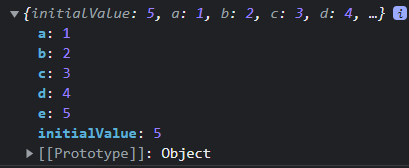
defaultProps
defaultProps 는 부모 Component 로 부터 전달 받지 못한 props 의 값을 기본 값으로 초기화 해주어 값이 넘어 오지 않았을 때 예외처리를 해 줄 수 있는 속성이다.
App.js 파일
App.js 파일
import logo from './logo.svg';
import Counter from './Counter';
import './App.css';

function App() {

  return (
    <div className="App">
      <header className="App-header">
        <Counter/> //spread 연산자 사용 가능
      </header>
    </div>
  );
}

export default App;
Counter.js 파일
import React, {useState} from "react"

const Counter = ({initialValue}) => {	//비구조화 할당으로 받을 수 도 있다.
    console.log(initialValue);	//undefined 출력
    const [count, setCount] = useState(0);

    const onIncrease = () => {
        setCount(count+1);
    }

    const onDecrease = () => {
        setCount(count-1);
    }

    return (
        <div>
            <h2>{count}</h2>
            <button onClick={onIncrease}>+</button>
            <button onClick={onDecrease}>-</button>
        </div>
    );
};

export default Counter;
defaultProps 사용한 Component.js 파일
import React, {useState} from "react"

const Counter = ({initialValue}) => {
    console.log(initialValue);	//0 출력
    const [count, setCount] = useState(0);

    const onIncrease = () => {
        setCount(count+1);
    }

    const onDecrease = () => {
        setCount(count-1);
    }

    return (
        <div>
            <h2>{count}</h2>
            <button onClick={onIncrease}>+</button>
            <button onClick={onDecrease}>-</button>
        </div>
    );
};

Counter.defaultProps = {	//defaultProps 사용
     initialValue:0
}
export default Counter;
참고
https://espania.tistory.com/350
[React] 입문 / State (상태)
State 개요 State 는 Component UI 의 데이터가 다양한 상황이나 이벤트에 따라서 변경이되면, Component UI가 자동으로 갱신되도록 동적 데이터를 관리하는 Object 이다. Component 가진 State 가 바뀌면 해당 Co.
espania.tistory.com
https://espania.tistory.com/333
[javascript] 비 구조화 할당
개념 [ ] 대괄호를 이용해서 배열이나 객체의 값을 순서대로 할당 받아서 사용할 수 있는 방법 배열의 비 구조화 할당 let arr = ['one', 'two', 'three']; let one = arr[0]; let two = arr[1]; let three = arr[..
espania.tistory.com
728x90
'React' 카테고리의 다른 글
| [React] 기본 / Life Cycle / Hooks (0) | 2022.03.23 |
|---|---|
| [React] 입문 / Props 응용 / re-render (0) | 2022.03.08 |
| [React] 입문 / State (상태) (0) | 2022.03.04 |
| [React] 입문 / JSX (0) | 2022.03.03 |
| [React] 입문 / Create React App 프로젝트 구성 (0) | 2022.03.03 |
댓글