
티스토리 뷰
flexbox는 레이아웃의 방향성이 일방적이기 때문에 단일 프로퍼티와 벨류값으로 웹페이지 전체를 디자인하지 못하는 단점이 존재한다. 이를 보완하기 위해 최근 3D 디자인을 만들 수 있는 grid layout이 개발되어 css flexbox에 비해 엘리먼트의 중첩 등 좀 더 다양한 디자인이 가능하다.
<div class="container">
        <div class="item item1">1</div>
        <div class="item item2">2</div>
        <div class="item item3">3</div>
        <div class="item item4">4</div>
        <div class="item item5">5</div>
        <div class="item item6">6</div>
        <div class="item item7">7</div>
        <div class="item item8">8</div>
        <div class="item item9">9</div>
        <div class="item item10">10</div>
  </div>
div container 안에 10개의 item div 들이 있을 때, 브라우저에서 보면 다음과 같다.

위에서 부터 가로 방향의 엘리먼트가 표현
.container{
display: flex;
}스타일을 추가하게 되면,

container 클래스에
.container {

  display: flex;

  border : 10px solid royalblue;

}
를 추가해서 컨테이너 박스의 전체 크기를 경계로 확인해 보면,

푸른색의 경계 테두리들이 화면 전체를 싸고 있는 것을 볼 수 있다.
여기서 display: flex 를 display: inline-flex 라고 하면,
.container {
  /*display: flex;*/ 주석
  display: inline-flex;
  border : 10px solid royalblue;
}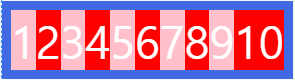
즉, flex 영역을 블록으로 쓰지 않고 illine block 으로 사용하는 것이다.
.container {
  display: flex;
  border : 10px solid royalblue;
  flex-direction:row;
}
.container {
  display: flex;
  border : 10px solid royalblue;
  flex-direction:column;
}
.container {
  display: flex;
  border : 10px solid royalblue;
  flex-direction:row-reverse;
}
.container {
  display: flex;
  border : 10px solid royalblue;
  flex-direction:column-reverse;
}
.container{
	display:flex;
	border : 10px solid royalblue;
 }

.item{
	width: 500px;
}
.container{
    display:flex;
    border : 10px solid royalblue;
    flex-wrap:wrap
 }

.item{
	width: 500px;
}
flex-wrap: nowrap 을 하면 처음의 display: flex 형태로 된다.
.container{
    display:flex;
    border : 10px solid royalblue;
    flex-wrap:nowrap
 }

.item{
	width: 500px;
}display: flex;라는 한줄의 property 와 value 는
flex-direction: row;
flex-wrap: nowrap;
을 모두 함축하고 있는 것이기 때문에
flex-flow : row nowrap;이렇게 css 숏컷(축약구문) 형식으로 한줄로 기록해도 된다.
참고
[Bootstrap] 레이아웃 / display(d-none, invisible)
. display(d-none) 웹 페이지에서 Elment 들을 필요에 따라 보이지 않게 해야할 때가 있다. CSS 에서는 display: hidden or display: none 속성을 사용하고, Bootstrap 에서는 d-none 라는 클래스 명을 사용하여 E..
espania.tistory.com
https://espania.tistory.com/142
[Bootstrap] 레이아웃 / display(d-flex)
1. d-flex - CSS3 flex 에서 flex 방향 -> flex-direction : row; - Bootstrap 에서 flex 방향 -> class 명에 d-flex flex-row 를 하면 됨 Item1 Item2 ..
espania.tistory.com
https://jsbin.com/qecowivuva/edit?html,output
JS Bin
Sample of the bin:
jsbin.com
https://css-tricks.com/snippets/css/a-guide-to-flexbox/%EF%BB%BF
'Bootstrap4' 카테고리의 다른 글
| [Bootstrap] 레이아웃 / auto margin (0) | 2020.04.03 |
|---|---|
| [Bootstrap] 레이아웃 / d-flex / justify-content / align-items / align-self (0) | 2020.04.03 |
| [Bootstrap] 레이아웃 / display(d-inline, d-block) (0) | 2020.03.29 |
| [Bootstrap] 레이아웃 / order / offset (0) | 2020.03.28 |
| [Bootstrap] 레이아웃 / COLUMN-2 /justify-content / align-items (0) | 2020.03.28 |